mirror of
https://forge.citizen4.eu/miklo/svg2scad2cc
synced 2026-09-13 01:48:11 +00:00
Inkscape plugin to convert SVG paths into an OpenSCAD cookie cutter (with stamp)
- Python 94.1%
- OpenSCAD 5.9%
| Filename | Latest commit message | Latest commit date |
|---|---|---|
| svgpath | ||
| test | ||
| .gitignore | ||
| LICENSE | ||
| README.md | ||
| svg2scad2cc.inx | ||
| svg2scad2cc.py | ||

svg2scad2cc
Inkscape plugin to convert SVG paths into an OpenSCAD cookie cutter (with stamp)
Usage:
- Unpack contents of the repo to the Inkscape extensions directory.
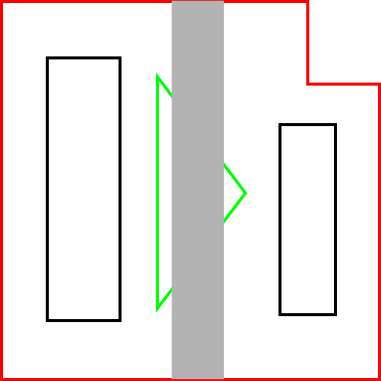
- Convert all objects to paths.
- red (no fill) - outer outline / through cut.
- green (no fill) - inner walls / through cut.
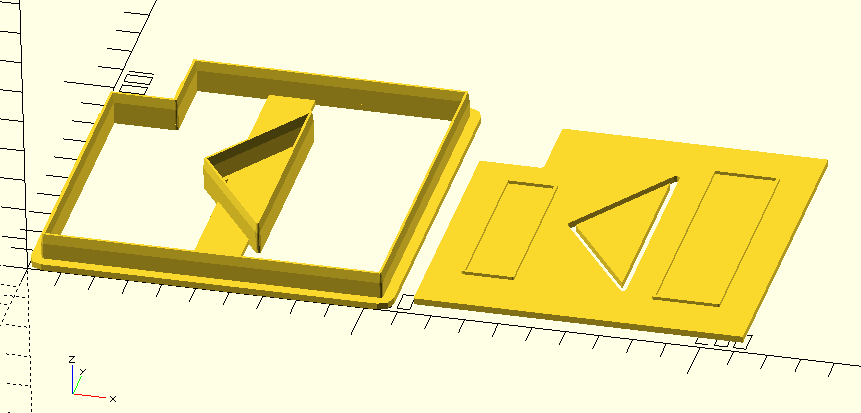
- black (no fill) - internal features. If a demoulding plate is selected, together they form a stamp.
- any color (fill without stroke) - connections between inner walls and outer outline.
- Select File -> Save As... "OpenSCAD cookie-cutter/stamp (*.scad)".
- Adjust parameters (wall thickness, generating demoulding plate/stamp).
- Load into OpenSCAD, generate STL, 3D print.

Credits
- Main code derived from https://github.com/arpruss/gcodeplot/blob/master/svg2cookiecutter.py(svg2cookiecutter) (c) Alexander R. Pruss
- SVG path code (c) Lennart Regebro, Justin Gruenberg
License
GPL v3.0